By default a UILabel doesn’t get any copy & paste commands in iOS. After all, it’s a label, why would you want to copy a label? It turns out, you might want to do that, if you are “abusing” a label to show something useful and in that case you probably want the entire label to be copied in one go, no “select”, just a simple copy.
This problem was beautifully solved on stackoverflow and you can see the solution here. For anyone else, the class is below.
In the end you implement this class:
// Original Source:
// https://stackoverflow.com/questions/1246198/show-iphone-cut-copy-paste-menu-on-uilabel

class CopyableLabel: UILabel {

    override init(frame: CGRect) {
        super.init(frame: frame)
        self.sharedInit()
    }

    required init?(coder aDecoder: NSCoder) {
        super.init(coder: aDecoder)
        self.sharedInit()
    }

    func sharedInit() {
        self.isUserInteractionEnabled = true
        self.addGestureRecognizer(UILongPressGestureRecognizer(target: self, action: #selector(self.showMenu)))
    }

    @objc func showMenu(sender: AnyObject?) {
        self.becomeFirstResponder()

        let menu = UIMenuController.shared

        if !menu.isMenuVisible {
            menu.setTargetRect(bounds, in: self)
            menu.setMenuVisible(true, animated: true)
        }
    }

    override func copy(_ sender: Any?) {
        let board = UIPasteboard.general

        board.string = text

        let menu = UIMenuController.shared

        menu.setMenuVisible(false, animated: true)
    }

    override var canBecomeFirstResponder: Bool {
        return true
    }

    override func canPerformAction(_ action: Selector, withSender sender: Any?) -> Bool {
        return action == #selector(UIResponderStandardEditActions.copy)
    }
}
…then you go do the identity inspector of your Label and select the Class as a Custom Class for the UILabel
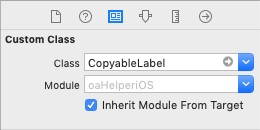
and then in your app, as you touch and hold on your Label, you’ll get a simple copy command:

And now you also know a dirty little secret of one of my Apps, the article title is a UILabel – I feel appropriately ashamed…